Repository navigation
[Question] Docker redirects automatically from port 8000 to 8080 #633
Description

Hi, I am trying to install and execute Wordpress, MySQL, PHPmyAdmin using docker-compose.
version: '3'

services:
  # Database
  db:
    image: mysql:5.7
    volumes:
      - db_data:/var/lib/mysql
    restart: always
    environment:
      MYSQL_ROOT_PASSWORD: password
      MYSQL_DATABASE: wordpress
      MYSQL_USER: wordpress
      MYSQL_PASSWORD: wordpress
    networks:
      - wpsite
  # phpmyadmin
  phpmyadmin:
    depends_on:
      - db
    image: phpmyadmin
    restart: always
    ports:
      - '8080:80'
    environment:
      PMA_HOST: db
      MYSQL_ROOT_PASSWORD: password
    networks:
      - wpsite
  # Wordpress
  wordpress:
    depends_on:
      - db
    image: wordpress:latest
    ports:
      - '8000:80'
    restart: always
    volumes: ['./:/var/www/html']
    environment:
      WORDPRESS_DB_HOST: db:3306
      WORDPRESS_DB_USER: wordpress
      WORDPRESS_DB_PASSWORD: wordpress
    networks:
      - wpsite
networks:
  wpsite:
volumes:
  db_data:
However, if I access http://localhost:8000 (Wordpress), it redirects me to http://localhost:8080 (PHP my admin).
I tried to change the port of PHP my Admin to 5000 then ran it. Afterwards, http://localhost:8000 (Wordpress) still redirected me to http://localhost:8080 (no services were running on this port).
I do not do port forwarding or installing web server such as Nginx. By the way, before adding the phpmyadmin service, http://localhost:8000 opens Wordpress and I had no issues.
This is the network tab when I open http://localhost:8000 (not 8080 although the picture shows http://localhost:8080) :
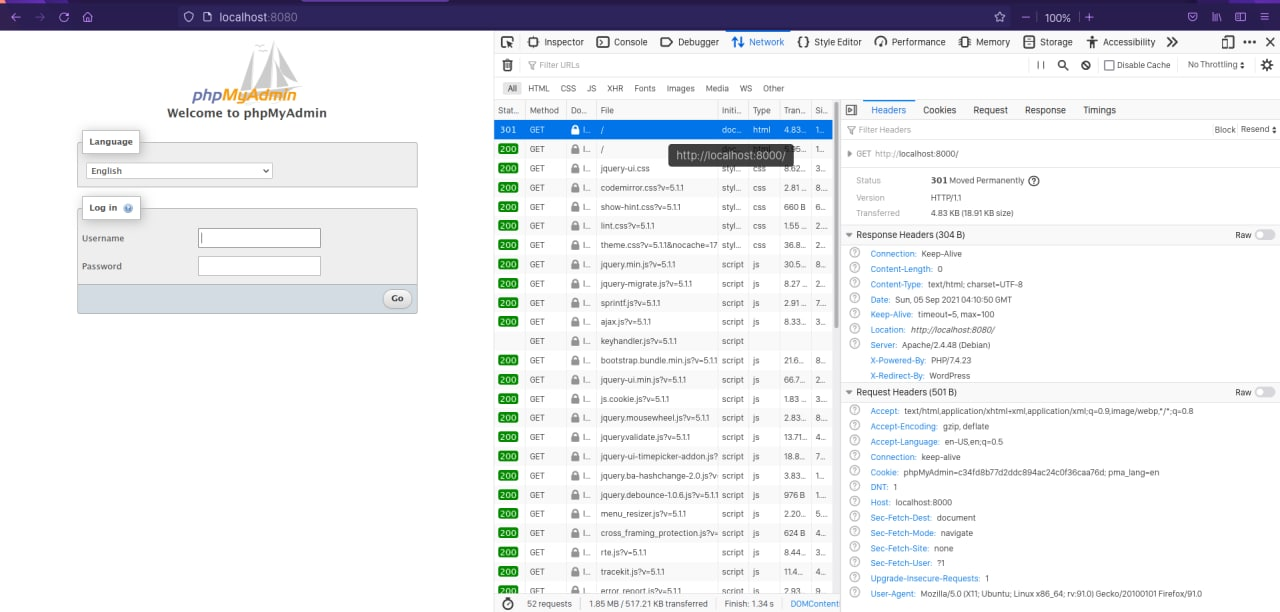
http://localhost:8000 got a status code 301 then it redirected me to http://localhost:8080 with the status code 200 (OK).
Could you please give me a clue what went wrong? Any help is appreciated!
System Information :
- Operating System : Ubuntu Focal Fossa 20.04 LTS
- Docker Compose : version 1.29.2, build 5becea4c
- Docker Engine : version 20.10.8, build 3967b7d
Another very similar issue in Windows 10 Pro : https://stackoverflow.com/questions/65921631/docker-redirect-automatically-from-port-8000-to-8080-docker-bug
Activity
yosifkit commentedon Sep 7, 2021
Did you first setup WordPress using
localhost:8080? WordPress saves which URL was first used to access and setup the site and will always redirect to that. If you have no important data in there, then deleting the WordPress files from the volume should work. Or You can try "Changing the Site URL".