





Playground | Migration | Data Capacity | Design Docs
FeatherQR generates and decodes QR Code, Micro QR, and rMQR symbols in .NET. Its hot paths allocate nothing, and it supports trimming and NativeAOT. The core package has no dependencies on .NET 10 and later, and uses only BCL compatibility packages on .NET Standard. It does not use System.Drawing.
 |
 |
 |
|---|
 |
 |
|---|
 |
|---|
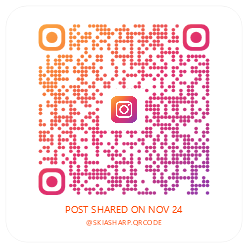
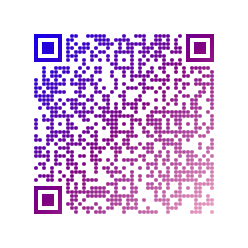
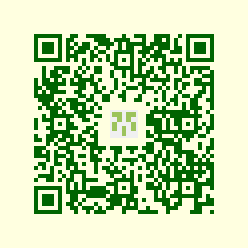
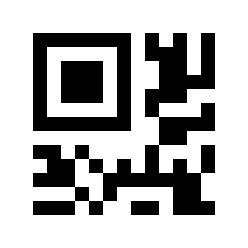
samples/ConsoleApp has the code for these images.
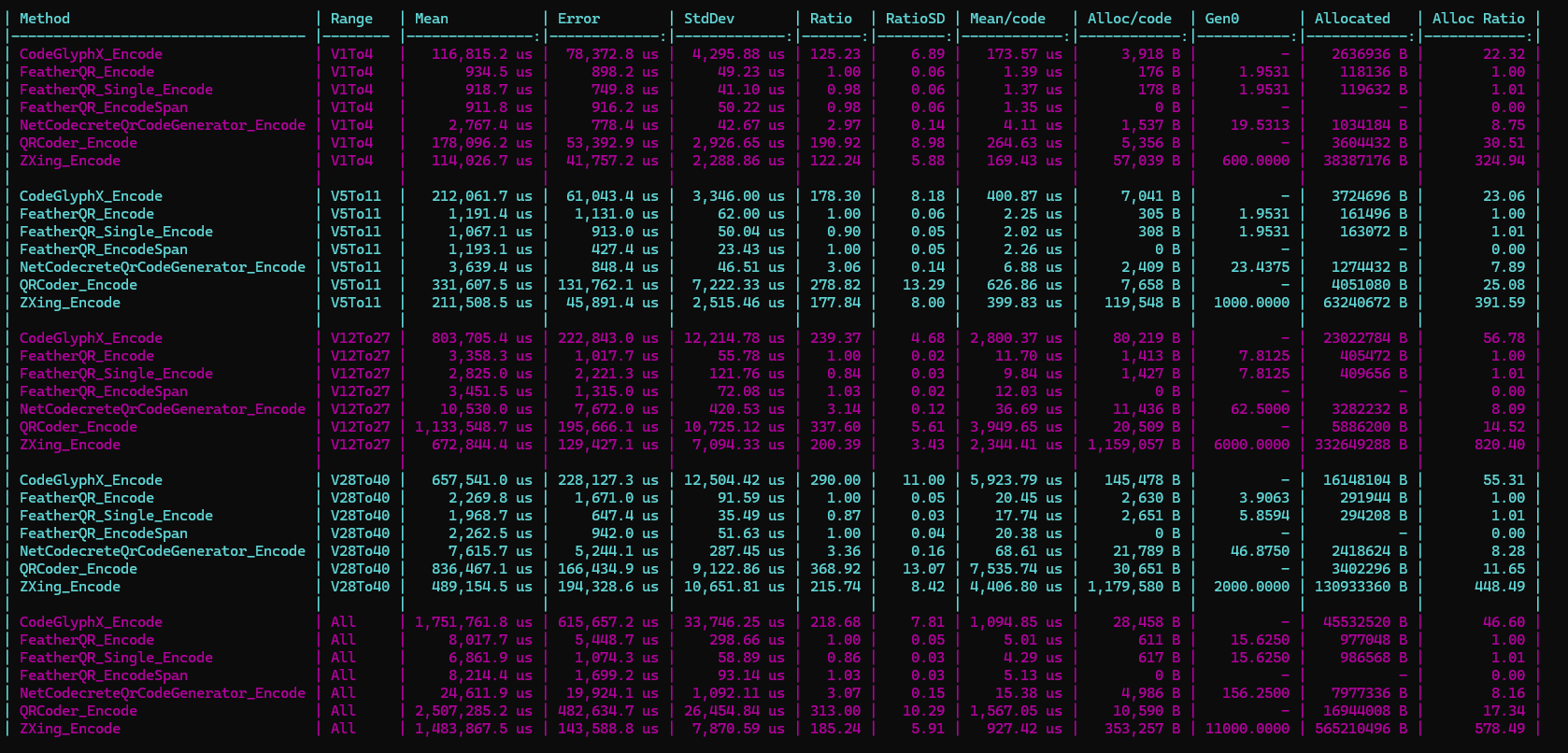
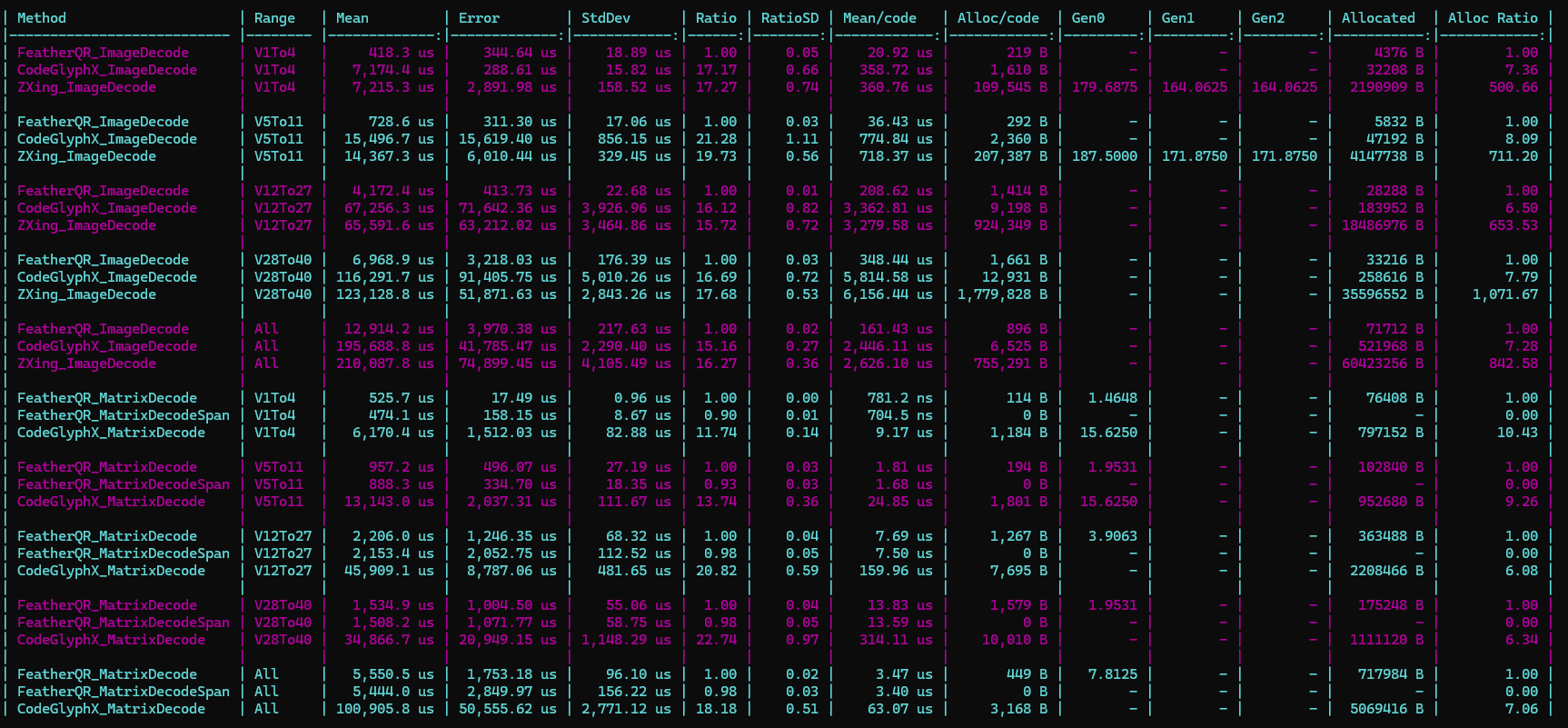
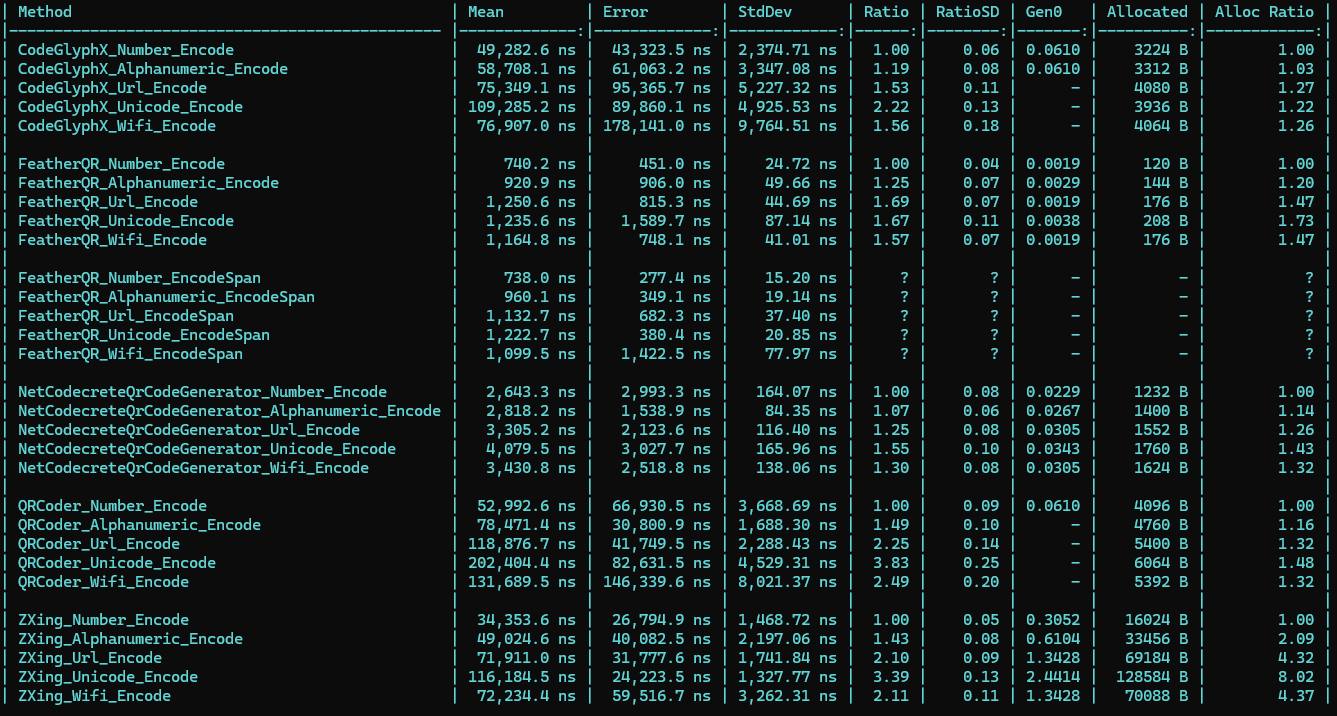
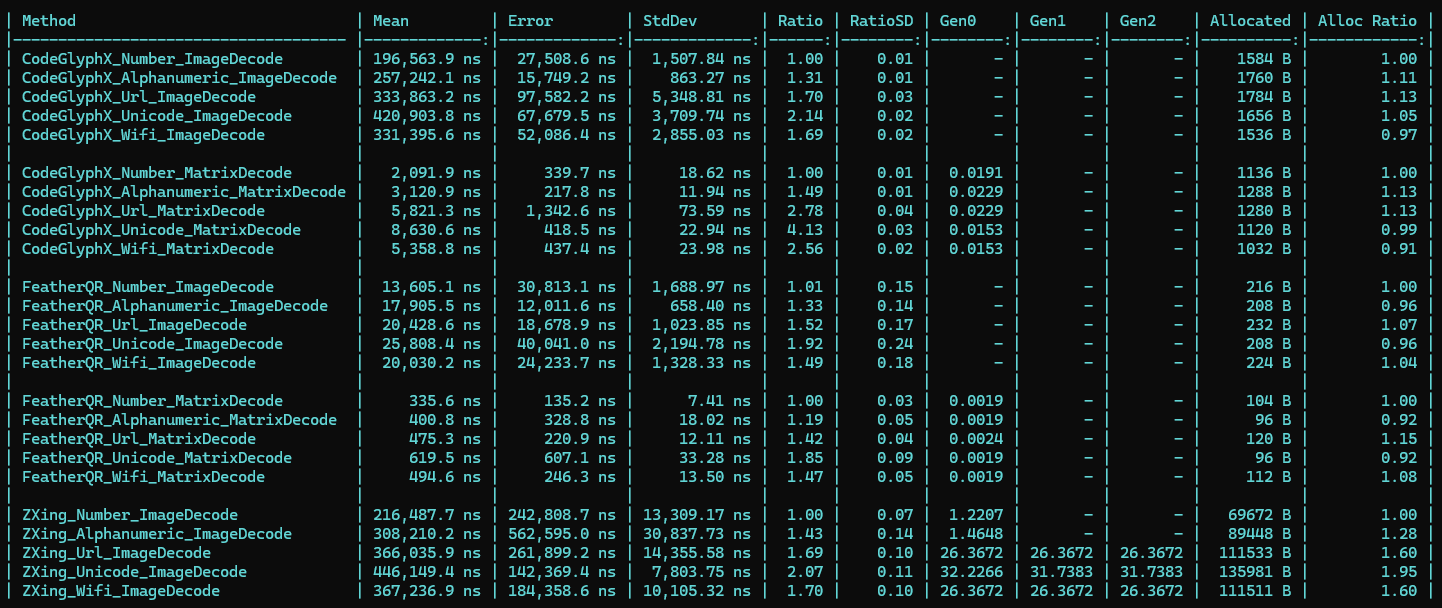
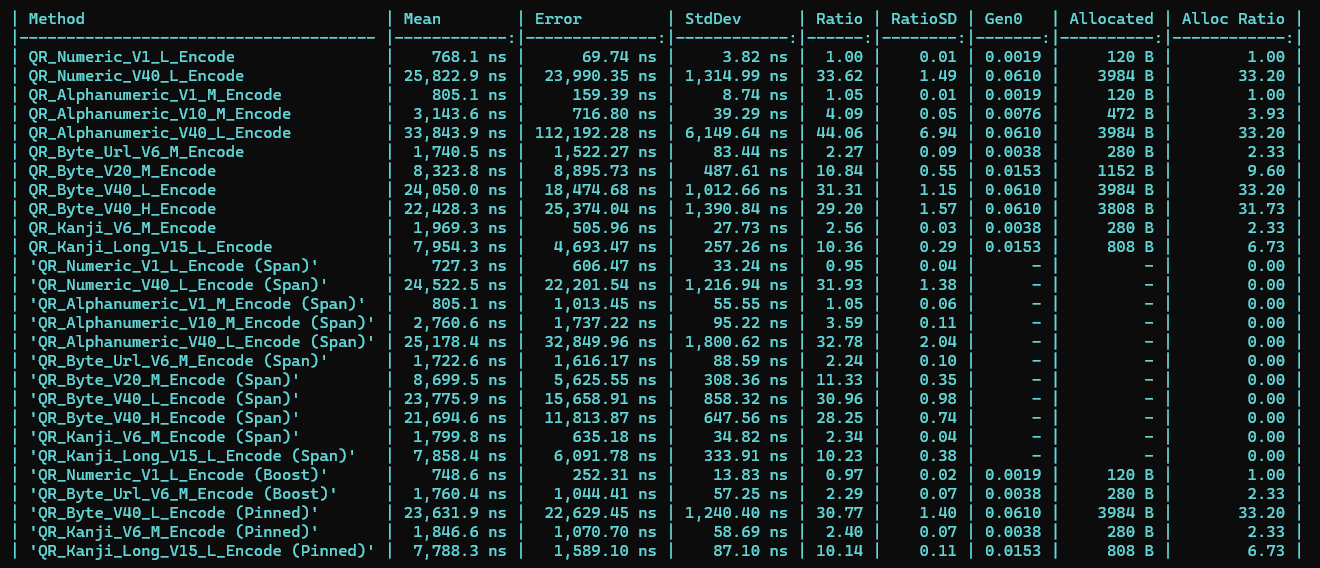
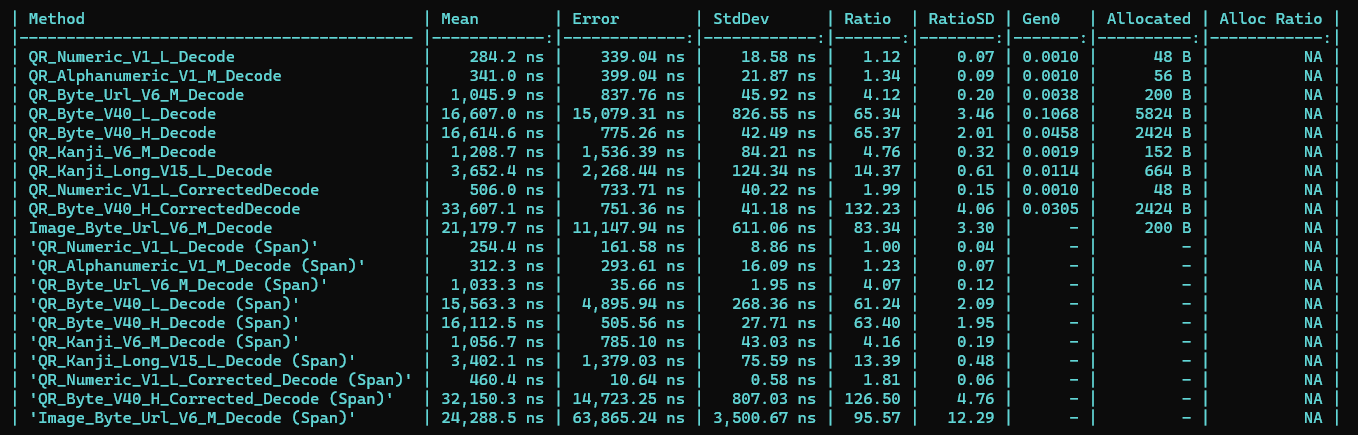
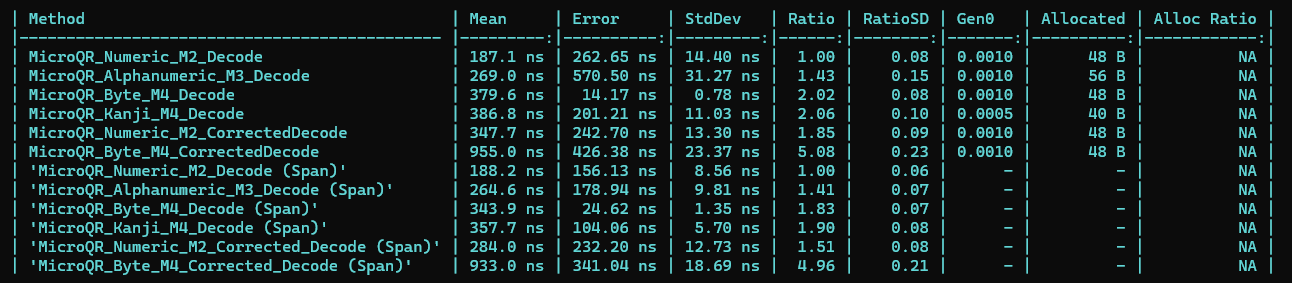
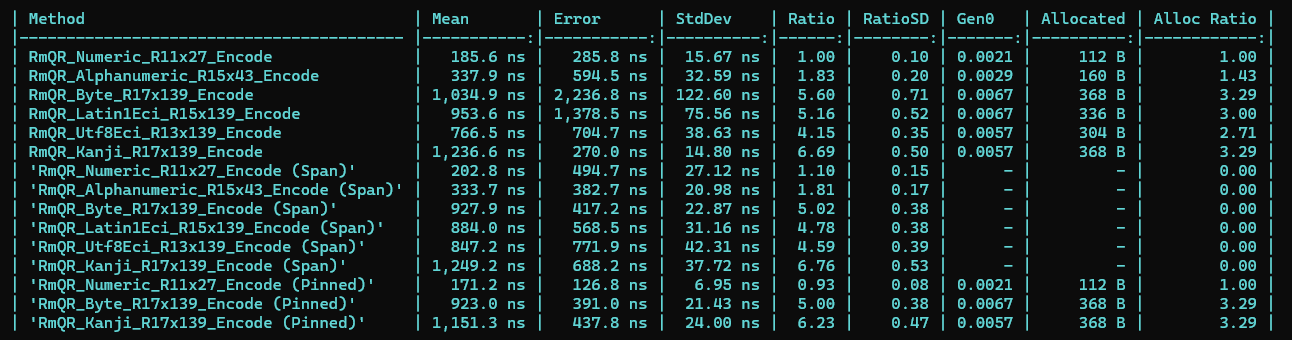
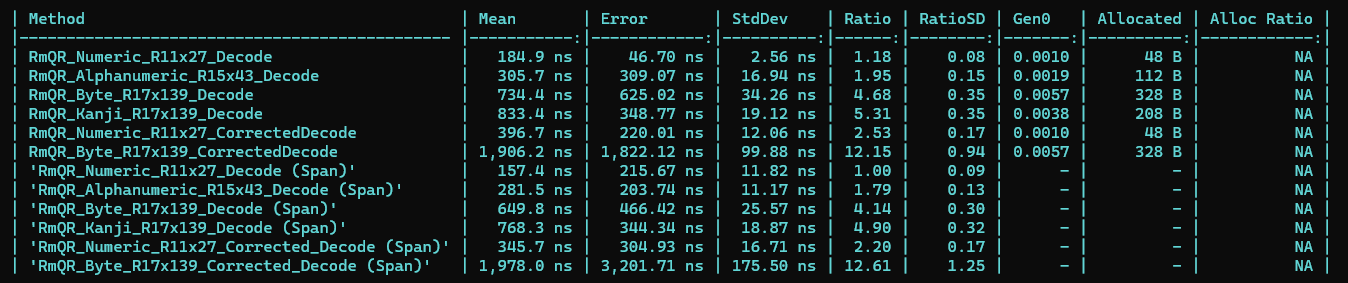
These benchmarks compare FeatherQR with other libraries on .NET 10 with an AMD Ryzen 9 7950X3D CPU. Benchmarks has the results for each symbology and for image output.
 |
 |
|---|
| Symbology | Standard | Generate | Decode |
|---|---|---|---|
| Standard QR (versions 1–40) | ISO/IEC 18004 | ✅ | ✅ |
| Micro QR (M1–M4) | ISO/IEC 18004 | ✅ | ✅ |
| rMQR (R7x43–R17x139) | ISO/IEC 23941 | ✅ | ✅ |
- Designed for speed and minimal memory allocation
- Get the dark modules as rectangles for your own renderer, or write SVG, small 1-bit PNG, raw pixels, and terminal text without additional dependencies.
- Render styled PNG, JPEG, WebP, and SVG images with gradients, shapes, and icons through SkiaSharp.
- Decode module matrices, pixels, image files, and streams, including every symbol in one image.
- Encode GS1 QR Codes, GS1 Digital Link URIs, binary data with any ECI, and Japanese text in Kanji mode.
- Run on Windows, Linux, macOS, iOS, Android, and WebAssembly.
| Package | What |
|---|---|
| FeatherQR | Generates and decodes all three symbologies. Writes SVG, PNG, raw pixels, and terminal text. No dependencies. |
| FeatherQR.SkiaSharp | Renders styled images (shapes, gradients, icons, JPEG, WebP) and decodes image files with SkiaSharp. |
| FeatherQR.Gs1 | Generates and reads GS1 QR Codes and GS1 Digital Link URIs. |
| SkiaSharp.QrCode | Empty package that depends on FeatherQR.SkiaSharp, for upgrading existing projects. |
dotnet add package FeatherQR

# Styled images or image file decoding
dotnet add package FeatherQR.SkiaSharp

# GS1 data
dotnet add package FeatherQR.Gs1
FeatherQR.SkiaSharp needs SkiaSharp native assets on Linux, with NativeAOT, and in WebAssembly. See SkiaSharp native assets.
Important
2.0.0 renames SkiaSharp.QrCode to FeatherQR and SkiaSharp.QrCode.Image to FeatherQR.SkiaSharp, with new namespaces. See the Migration Guide.
The Playground runs FeatherQR in your browser as WebAssembly. Style a symbol, download it as PNG or SVG, share the settings as a link, and decode QR codes from an uploaded image.
The examples use .NET 10 and C# 14. They leave out repeated using directives and assume inputs such as an image file, a bitmap, or an ASP.NET Core app.
using FeatherQR;

var qr = QRCodeGenerator.Create("https://example.com", QREccLevel.M);
File.WriteAllBytes("qrcode.png", SymbolImageWriter.GetPngBytes(qr));
File.WriteAllText("qrcode.svg", SymbolImageWriter.GetSvgString(qr));

if (QRCodeDecoder.TryDecode(qr, out var text))
    Console.WriteLine(text);
With FeatherQR.SkiaSharp:
using SkiaSharp;
using FeatherQR;
using FeatherQR.SkiaSharp;

File.WriteAllBytes("qrcode.png", QRCodeImageBuilder.GetPngBytes("https://example.com"));

using var bitmap = SKBitmap.Decode("qrcode.png");
if (QRCodeDecoder.TryDecode(bitmap, out var text))
    Console.WriteLine(text);
Both packages write an image from the same symbol. With a 512 × 512 size, the builders' default, the two packages give the same PNG pixels.
var qr = QRCodeGenerator.Create("https://example.com", QREccLevel.M);
var options = new SymbolImageOptions { Width = 512, Height = 512 };| Output | FeatherQR |
FeatherQR.SkiaSharp |
|---|---|---|
| PNG | SymbolImageWriter.GetPngBytes(qr, options) |
QRCodeImageBuilder.GetPngBytes(qr) |
| SVG | SymbolImageWriter.GetSvgString(qr, options) |
QRCodeImageBuilder.GetSvgString(qr) |
| Stream | stream.Write(SymbolImageWriter.GetPngBytes(qr, options)) |
QRCodeImageBuilder.SavePng(qr, stream) |
| Stream, async | await stream.WriteAsync(SymbolImageWriter.GetPngBytes(qr, options)) |
await QRCodeImageBuilder.SavePngAsync(qr, stream) |
| Buffer writer | SymbolImageWriter.WritePng(qr, bufferWriter, options) |
QRCodeImageBuilder.WritePng(qr, bufferWriter) |
FeatherQR generates and decodes symbols and writes plain images.
| What | Standard QR | Micro QR | rMQR |
|---|---|---|---|
| Generate a module matrix | QRCodeGenerator |
MicroQRCodeGenerator |
RmQRCodeGenerator |
| Get dark modules as rectangles for your own renderer | GetModuleRectangles |
GetModuleRectangles |
GetModuleRectangles |
| Write SVG, PNG, raw pixels, or terminal text | SymbolImageWriter |
SymbolImageWriter |
SymbolImageWriter |
| Decode a matrix or grayscale pixels | QRCodeDecoder |
MicroQRCodeDecoder |
RmQRCodeDecoder |
| Decode all symbol types from grayscale pixels | SymbolDecoder |
SymbolDecoder |
SymbolDecoder |
| Convert pixels to grayscale for decoding | LuminanceConverter |
LuminanceConverter |
LuminanceConverter |
FeatherQR.SkiaSharp adds gradients, custom shapes, icons drawn into raster images, JPEG and WebP output, drawing to an SKCanvas, and decoding from SKBitmap objects and image files.
| What | Standard QR | Micro QR | rMQR |
|---|---|---|---|
| Create styled PNG, JPEG, WebP, or SVG | QRCodeImageBuilder |
MicroQRCodeImageBuilder |
RmQRCodeImageBuilder |
Render a matrix to SKCanvas |
SymbolRenderer |
SymbolRenderer |
SymbolRenderer |
Decode an SKBitmap or an image file |
QRCodeDecoder |
MicroQRCodeDecoder |
RmQRCodeDecoder |
Decode all symbol types from an SKBitmap or an image file |
SymbolDecoder |
SymbolDecoder |
SymbolDecoder |
Both packages use the same image settings. The core takes them in SymbolImageOptions, and the builders take them as methods. With default colors and square modules, both give the same pixels for the same size.
| What | FeatherQR |
FeatherQR.SkiaSharp |
|---|---|---|
| Size, equal modules | Width = 512, Height = 512 |
.WithSize(512, 512) |
| Size, filled | Width = 512, Height = 512, FillCanvas = true |
.WithSize(512, 512).WithFillCanvas() |
| Modules | ModuleStyle = ModuleStyle.Circle, ModuleScalePercent = 92 |
.WithModuleStyle(ModuleStyle.Circle, scalePercent: 92) |
| Finder patterns | FinderPatternStyle = FinderPatternStyle.Circle |
.WithFinderPatternStyle(FinderPatternStyle.Circle) |
| Colors | DarkColor = new SymbolColor(30, 58, 138), LightColor = new SymbolColor(255, 255, 255, 0) |
.WithColors(new SKColor(30, 58, 138), SKColors.Transparent) |
| Icon | IconSizeModules = 7, IconImage = File.ReadAllBytes("logo.png") |
.WithIcon(IconData.FromImageByModules(logo, 7)) |
| SVG | SymbolImageWriter.GetSvgString(qr, options) |
.ToSvgString() |
| PNG | SymbolImageWriter.GetPngBytes(qr, options) |
.ToByteArray() |
| Raw pixels | SymbolImageWriter.TryWritePixels(qr, buffer, PixelLayout.Rgba8888, premultipliedAlpha: false, out var width, out var height, options) |
.ToBitmap() |
| Read an image | QRCodeDecoder.TryDecodeImage(gray, width, height, out string text, out _) |
QRCodeDecoder.TryDecode(bitmap, out string text) |
For small PNG files, use the core. It writes a plain symbol as a 1-bit PNG, and FeatherQR.SkiaSharp writes 8-bit RGB. For the same 512 × 512 image, the core's file is about a quarter to half the size. A styled symbol needs antialiased edges, so the core writes it as a 4-bit PNG, which is larger than the 1-bit file.
The error correction level sets how much of a damaged or covered symbol a reader can recover.
| Level | Recovers | Use for |
|---|---|---|
L |
About 7% | Clean environments, maximum capacity |
M |
About 15% | General purpose |
Q |
About 25% | Outdoor use, some damage expected |
H |
About 30% | Icons, custom module shapes, harsh environments |
Error correction boosting treats the level as a minimum. The generator selects the highest level that fits without a larger symbol.
var wifi = QRCodeGenerator.Create("WIFI:T:WPA;S:MyNetwork;P:MyPassword;;", QREccLevel.M);

// M is the minimum. Q or H may fit at the same symbol size.
var robust = QRCodeGenerator.Create("https://example.com", QREccLevel.M, new QRCodeGeneratorOptions { BoostEccLevel = true });

// The builders take the content and the level directly.
var pngBytes = new QRCodeImageBuilder("https://example.com")
    .WithErrorCorrection(QREccLevel.M)
    .WithErrorCorrectionBoost()
    .ToByteArray();
Default square modules scan best. Circles, rounded squares, and smaller modules leave gaps that cause more scan errors. Icons cover symbol data. Use H, or boosting, with any of them.
Each generator has an overload that takes options. The options are record structs. default(QRCodeGeneratorOptions) is the same as QRCodeGeneratorOptions.Default, and the same holds for the other two. with makes a changed copy.
var options = new QRCodeGeneratorOptions { EciMode = EciMode.Utf8, QuietZoneSize = 0 };
var qr = QRCodeGenerator.Create("content", QREccLevel.M, options);
var pinned = options with { Version = 20 }; // options does not change

var rmqr = RmQRCodeGenerator.Create("content", RmQREccLevel.M, new RmQRCodeGeneratorOptions
{
    Height = RmQRHeight.H9,
    Segmentation = RmQRSegmentation.Single, // Prefer speed over symbol size
});| Option | QRCodeGeneratorOptions |
MicroQRCodeGeneratorOptions |
RmQRCodeGeneratorOptions |
|---|---|---|---|
EciMode |
Default (auto-detect) |
— | Default (auto-detect) |
Utf8Bom |
false |
— | — |
Version |
Any (1-40) |
Any (M1-M4) |
null (fit automatically) |
QuietZoneSize |
4 |
2 |
2 |
BoostEccLevel |
false |
— | — |
MaskPattern |
null (automatic, 0-7) |
null (automatic, 0-3) |
— |
FitStrategy |
— | — | MinimizeArea |
Height |
— | — | null (any height) |
Segmentation |
Optimal |
Optimal |
Optimal |
Fnc1 |
None |
— | None |
AllowKanji |
false |
false |
false |
Tip
The default quiet zones follow the standards: 4 modules for Standard QR and 2 for Micro QR (ISO/IEC 18004), and 2 for rMQR (ISO/IEC 23941). All three accept 0.
Version 1 is 21 × 21 modules. Each version adds 4 modules per side, up to 177 × 177 at version 40. The generator selects the smallest version that fits the content at the requested level. The Data Capacity Reference lists the capacity of each version.
For Standard QR and Micro QR, set Version to one version or a range. If no version in the range fits, TryGetRequiredBufferSize returns false and Create throws.
var exact = new QRCodeGeneratorOptions { Version = 15 };                          // exactly version 15
var range = new QRCodeGeneratorOptions { Version = new(10, 20) };                  // 10 to 20, inclusive
var minimum = new QRCodeGeneratorOptions { Version = QRVersionRange.AtLeast(10) }; // 10 or larger
rMQR versions have no single size order. R7x43, R9x43, and R7x59 differ in width and height. So rMQR uses FitStrategy and Height instead. See rMQR.
The generator scores each mask pattern and applies the best one. Set MaskPattern to reproduce a symbol byte for byte, or to test a scanner with each pattern. QRCodeData and MicroQRCodeData report the final EccLevel and MaskPattern, including a boost. rMQR has one fixed mask.
// Encode again with the level and mask that the decoder read
if (QRCodeDecoder.TryDecode(bitmap, out var text, out var info))
{
    var identical = QRCodeGenerator.Create(text, info.EccLevel, new QRCodeGeneratorOptions { MaskPattern = info.MaskPattern });
}

var png = new QRCodeImageBuilder("content").WithMaskPattern(3).ToByteArray();The default Optimal segmentation splits the content into Numeric, Alphanumeric, and Byte segments to use the fewest bits. This often gives a smaller symbol, and can fit content that is too long for one mode. Single encodes all content in one mode, as 1.x did. rMQR has the same option as RmQRSegmentation.
const string content = "https://example.com/item?id=123456789012345678901234567890";

var optimal = QRCodeGenerator.Create(content, QREccLevel.M);
Console.WriteLine(optimal.Version); // 3: Byte + Numeric

var single = QRCodeGenerator.Create(content, QREccLevel.M, new QRCodeGeneratorOptions { Segmentation = QRSegmentation.Single });
Console.WriteLine(single.Version); // 4: one Byte segmentThe generator selects the mode of each segment.
| Mode | Characters | Bits per character |
|---|---|---|
| Numeric | 0–9 | About 3.3 |
| Alphanumeric | 0–9, A–Z, space, $ % * + - . / : |
About 5.5 |
| Byte | ISO-8859-1 or UTF-8 | 8 |
| Kanji | JIS X 0208, with AllowKanji |
13 |
The generators write text as ISO-8859-1, UTF-8, or Kanji mode. For another encoding, such as ISO-8859-2 or Shift JIS in Byte segments, encode the text yourself. Then pass the bytes with an eciAssignment that names the encoding, such as 4 for ISO-8859-2 or 20 for Shift JIS. See Binary data. The decoders read Shift JIS with ECI 20, or detect it when there is no ECI header. For other encodings, they return UnsupportedContent and report the encoding in EciAssignment. Then read the bytes with TryDecodeBytes.
By default, the generators write Japanese text as UTF-8 in Byte mode. With AllowKanji, text in JIS X 0208 uses Kanji mode, which holds about 1.85 times as many characters. The decoders read Kanji mode from any encoder.
Kanji mode is off by default because some readers cannot read it. In tests, the QR scanner of an Android 17 phone and Google Lens could not read it. The iPhone camera and the dedicated readers tested could.
var kanji = new QRCodeGeneratorOptions { AllowKanji = true };

QRCodeGenerator.Create("日本語のテキスト", QREccLevel.M);        // UTF-8, version 2
QRCodeGenerator.Create("日本語のテキスト", QREccLevel.M, kanji); // Kanji, version 1
QRCodeGenerator.Create("東京タワー333m", QREccLevel.M, kanji);   // Kanji and ASCII segments, version 1
MicroQRCodeGenerator.Create("こんにちは", MicroQREccLevel.L, new MicroQRCodeGeneratorOptions { AllowKanji = true }); // M3, where UTF-8 needs M4
Even with AllowKanji, the text stays UTF-8 in these cases:
- A character is outside JIS X 0208, such as an emoji, ①, or halfwidth katakana.
- A character is one of the seven that Windows (CP932) reads differently, such as the wave dash 〜.
- You set
EciModeto a charset, or setUtf8Bom. Singlesegmentation is set and the text mixes Japanese with ASCII.
The generators accept raw bytes, and the decoders return bytes without text conversion.
byte[] payload = [0x00, 0x01, 0x7F, 0x80, 0xFF];
var qrData = QRCodeGenerator.Create(payload, QREccLevel.M);                        // no ECI header
var declared = QRCodeGenerator.Create(payload, QREccLevel.M, eciAssignment: 899); // declared as binary data

if (QRCodeDecoder.TryDecodeBytes(qrData, out var bytes, out var info))
Console.WriteLine($"{bytes.Length} bytes, ECI {info.EciAssignment?.ToString() ?? "none"}");eciAssignmentwrites an ECI header from 0 to 999999. Without it, the symbol has no header, which is usual for binary data.RmQRCodeGeneratorhas the same overloads. Micro QR has no ECI, soMicroQRCodeGeneratorhas noeciAssignment.TryDecodeBytesreads a symbol, a matrix, or anSKBitmap.TryDecodeImageBytesreads luminance data. Both return Byte segments unchanged, digits and letters as ASCII, and Kanji as Shift JIS byte pairs.- The text-only options
EciMode,Utf8Bom,AllowKanji, andFnc1throw with byte input.
Note
Phone cameras may not show binary data. In tests, an iPhone camera found a binary symbol but showed no content. A QR reader app could not read it. Both happened with and without ECI 899. Use binary data with readers your app controls. For other readers, encode the data as text. Base45 in Alphanumeric mode adds about 3% to the raw bytes, and Base64 in Byte mode adds 33%.
CreateStructuredAppend splits one message across up to 16 Standard QR symbols for a reader to join. It uses the fewest symbols in the version range, all at one version. Text that fits in one symbol gives one symbol.
var symbols = QRCodeGenerator.CreateStructuredAppend(longText, QREccLevel.M, new QRCodeGeneratorOptions { Version = QRVersionRange.AtMost(10) });
// symbols.Length is 1 to 16. Render each symbol as usual.
Each symbol decodes to one part. QRCodeDecodeInfo.StructuredAppend gives its index, count, and parity. QRStructuredAppend describes how to join the parts. Bytes split the same way: decode each part as bytes and join them in index order.
FeatherQR.Gs1 adds GS1 methods to the Standard QR and rMQR generators. It validates data against the GS1 General Specifications and converts between (AI) text, element strings, and GS1 Digital Link URIs.
| Carrier | Used for | Method |
|---|---|---|
| QR Code with a GS1 Digital Link URI | Retail point of sale | CreateGs1DigitalLink |
| GS1 QR Code (FNC1 in first position) | Healthcare, logistics, assets, and other uses away from the point of sale | CreateGs1 |
using FeatherQR.Gs1;

// GS1 QR Code. The generator places the separators and sets FNC1.
var gs1 = QRCodeGenerator.CreateGs1("(01)09520123456788(17)251231(10)ABC123", QREccLevel.M);

// https://id.gs1.org/01/09520123456788/10/ABC123?17=251231
var link = QRCodeGenerator.CreateGs1DigitalLink("(01)09520123456788(17)251231(10)ABC123", QREccLevel.M);

// Your own domain: https://brand.example/01/09520123456788
var branded = QRCodeGenerator.CreateGs1DigitalLink("(01)09520123456788", QREccLevel.M, stem: "https://brand.example");

// (AI) text from a decoded symbol of either carrier
if (QRCodeDecoder.TryDecode(bitmap, out var text, out var info) && Gs1ElementString.TryRead(text, info.Fnc1, out var hri, out _))
    Console.WriteLine(hri); // (01)09520123456788(17)251231(10)ABC123
Input that starts with ( is (AI) text. Other input is an element string, with U+001D after each variable-length value. Invalid data throws Gs1FormatException, and its Error gives the kind of failure and its position. TryRead checks only the structure and accepts a wrong check digit.
Gs1ElementString also works without a symbol. TryValidate checks lengths, characters, check digits, dates, and AI combinations. TryFromHri, TryToHri, TryToDigitalLink, and TryFromDigitalLink convert between the forms, and EnumerateElements lists the AIs and values. The Try methods return a Gs1Error instead of throwing, and the conversions have span overloads that do not allocate.
Note
- Leave
EciModeat its default. GS1 QR Code does not support ECI. - The default Standard QR quiet zone of 4 modules meets the GS1 requirement.
- GS1 General Specifications Release 26.0 does not list rMQR as a carrier, so a GS1 scanner may not accept it. GS1 excludes Micro QR, which has no FNC1 mode.
- The AI table comes from the GS1 Barcode Syntax Dictionary release in
Gs1ElementString.DictionaryRelease. Newer AIs fail withUnknownAiuntil a package update includes them.
All three generators can write the module matrix to your Span<byte>, and all three decoders can write text to your Span<char>. Use these overloads to pool or reuse buffers. Get the buffer size from TryGetRequiredBufferSize, with the same options you encode with.
using System.Buffers;

// false means the content does not fit. Invalid arguments always throw.
if (!QRCodeGenerator.TryGetRequiredBufferSize("content", QREccLevel.M, out var calculated))
    return;

var buffer = ArrayPool<byte>.Shared.Rent(calculated.BufferSize);
try
{
    var written = QRCodeGenerator.Create("content", QREccLevel.M, buffer);
    var matrix = buffer.AsSpan(0, written);
}
finally
{
    ArrayPool<byte>.Shared.Return(buffer);
}
For rMQR, pass the resolved Version from TryGetRequiredBufferSize back to Create to skip version selection.
samples/ConsoleAppCore and samples/ConsoleApp make the images in this section at 248 × 248.
GetModuleRectangles returns the dark modules as merged rectangles. An app that draws with a GPU or its own graphics API draws them directly, with no image to encode, decode, or upload as a texture. The edges stay sharp at any scale.
The coordinates are in modules, include the quiet zone, and match the qr[row, col] indexer. Multiply them by the pixels per module, or scale them in a shader or an SVG viewBox. The rectangles cover exactly the dark modules and do not overlap, so a translucent color stays even.
using System.Globalization;
using System.Text;
using FeatherQR;

var qr = QRCodeGenerator.Create("https://example.com", QREccLevel.M);

// GPU: one quad per rectangle, in pixels
const float scale = 8; // pixels per module
foreach (var r in qr.GetModuleRectangles())
    batch.AddQuad(r.X * scale, r.Y * scale, r.Width * scale, r.Height * scale); // your sprite batch or vertex buffer

// SVG: one path in module units
var sb = new StringBuilder();
sb.Append($"<svg xmlns=\"http://www.w3.org/2000/svg\" viewBox=\"0 0 {qr.Size} {qr.Size}\" shape-rendering=\"crispEdges\">");
sb.Append("<rect width=\"100%\" height=\"100%\" fill=\"#fff\"/><path fill=\"#000\" d=\"");
foreach (var r in qr.GetModuleRectangles())
    sb.Append(CultureInfo.InvariantCulture, $"M{r.X},{r.Y}h{r.Width}v{r.Height}h{-r.Width}z");
sb.Append("\"/></svg>");
If you anti-alias each rectangle separately, a faint seam shows where two rectangles meet inside a pixel. Fill them as one path, or align the edges to whole pixels. See Pattern 30 in samples/ConsoleApp and ToDrawingImage in samples/Dotfiles/Wpf.cs.
MicroQRCodeData and RmQRCodeData have the same members. rMQR uses Width and Height instead of Size. To avoid allocation, size a pooled buffer with GetModuleRectanglesMaxCount() and call TryGetModuleRectangles(Span<ModuleRect>, out int).
SymbolImageWriter writes SVG, PNG, raw pixels, and terminal text from any symbol with only the core package. A symbol gives the same bytes on every target framework.
File.WriteAllText("qrcode.svg", SymbolImageWriter.GetSvgString(qr));
File.WriteAllBytes("qrcode.png", SymbolImageWriter.GetPngBytes(qr));
Each module is a sharp square of ModulePixelSize pixels, 8 by default. The image includes the quiet zone. To remove it, copy the symbol with new QRCodeData(qr.GetRawData(), quietZoneSize: 0). PNG output is 1-bit, which keeps the file small, or 4-bit when styled. Black on white is grayscale, and other colors use a palette.
Set ModulePixelSize, or set Width and Height for a fixed image size. In a fixed size, every module gets the same whole number of pixels, the largest that fits. The writer centers the symbol and fills the rest with the light color. A dimension of 0 follows the symbol's aspect ratio.
FillCanvas = true makes the symbol fill the image, at a fractional scale where neighboring modules can differ by one pixel. Use it when the symbol must fill a fixed area while the content length changes. Without it, dense symbols are smaller: in 512 × 512, version 10 fills 89% of each side and version 40 fills 72%.
var png10 = SymbolImageWriter.GetPngBytes(qr, new SymbolImageOptions { ModulePixelSize = 10 });
var png512 = SymbolImageWriter.GetPngBytes(qr, new SymbolImageOptions { Width = 512, Height = 512 });
var filled = SymbolImageWriter.GetPngBytes(qr, new SymbolImageOptions { Width = 512, Height = 512, FillCanvas = true });
var svg300 = SymbolImageWriter.GetSvgString(qr, new SymbolImageOptions { Width = 300 }); // height follows the aspect ratio
GetSymbolRectangle returns the symbol's pixel rectangle without the quiet zone. Use it to draw a frame or to check the module size. The writer rounds the edges to whole pixels, so do not calculate them from the scale.
var options = new SymbolImageOptions { Width = 400, Height = 300 };
var (x, y, width, height) = SymbolImageWriter.GetSymbolRectangle(qr, options);Colors support alpha. A fully transparent light color leaves out the background. ModuleStyle draws modules as circles or rounded squares, and ModuleScalePercent shrinks them in their cells. FinderPatternStyle styles the finder patterns separately and keeps them recognizable. ModuleCornerRadiusPercent and FinderPatternCornerRadiusPercent set the corner radius, 30 percent by default. Styled PNG and raw pixels have antialiased edges with sixteen levels.
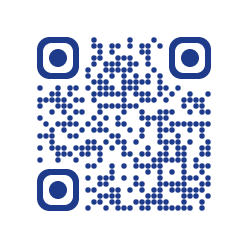
IconSizeModules keeps a centered square free for an icon on a Standard QR code, and IconBorderModules sets its light border. SVG output embeds IconImage. PNG and raw pixel output leave the area light, and GetIconRectangle returns where to draw the icon. Use QREccLevel.H. The writer rejects an icon that reaches a finder pattern. It also rejects an icon whose side, with its border, exceeds MaxCoreOccupancyPercent of the symbol's side without the quiet zone.
var navyOnClear = new SymbolImageOptions
{
    DarkColor = new SymbolColor(0x1E, 0x3A, 0x8A),
    LightColor = new SymbolColor(0, 0, 0, 0), // transparent background
};

var styled = new SymbolImageOptions
{
    ModuleStyle = ModuleStyle.Circle,
    ModuleScalePercent = 90,
    FinderPatternStyle = FinderPatternStyle.RoundedSquareCircle,
    DarkColor = new SymbolColor(0x1E, 0x3A, 0x8A),
};

// Version 5 fits a 7-module icon and its border under the 30 percent limit
var qrH = QRCodeGenerator.Create("https://github.com/guitarrapc/FeatherQR", QREccLevel.H);
var withIcon = new SymbolImageOptions { IconSizeModules = 7, IconImage = File.ReadAllBytes("logo.png") };
var svgWithLogo = SymbolImageWriter.GetSvgString(qrH, withIcon);                       // the logo embedded
var (x, y, iconWidth, iconHeight) = SymbolImageWriter.GetIconRectangle(qrH, withIcon); // draw the logo here in PNG or pixels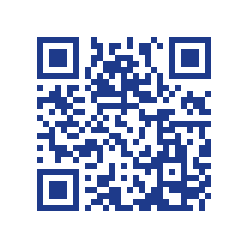 |
 |
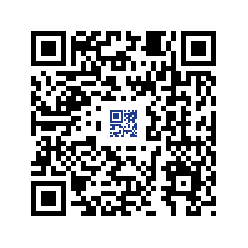 |
|---|
WriteSvg and WritePng write to an IBufferWriter<byte> without allocations after warmup. TryWritePixels writes to your buffer in Gray8, Rgba8888, Bgra8888, Rgb888x, Bgr888x, Rgb24, or Bgr24. Pass a Gray8 buffer directly to TryDecodeImage. Pass premultipliedAlpha: true when the target surface expects premultiplied alpha. It changes only colors with an alpha below 255.
To write into memory that another image type owns, get the size with GetImageSize and pass that image's row stride. The bytes between rows stay untouched. To write into a region of a larger image, slice the buffer at the region's first pixel and pass the larger image's stride.
var pixels = new byte[SymbolImageWriter.GetPixelBufferSize(qr, PixelLayout.Bgra8888)];
SymbolImageWriter.TryWritePixels(qr, pixels, PixelLayout.Bgra8888, premultipliedAlpha: false, out var width, out var height);

var at = (top * canvasWidth + left) * 4; // a region of a larger RGBA canvas
SymbolImageWriter.TryWritePixels(qr, canvas.AsSpan(at), canvasWidth * 4, PixelLayout.Rgba8888, premultipliedAlpha: false, out _, out _);
GetTerminalText draws two module rows per line with half-block characters, including the quiet zone.
Console.OutputEncoding = System.Text.Encoding.UTF8;                 // a CJK code page prints some half blocks as ?
Console.Write(SymbolImageWriter.GetTerminalText(qr));               // for a light terminal
Console.Write(SymbolImageWriter.GetTerminalText(qr, invert: true)); // for a dark terminalQRCodeImageBuilder, MicroQRCodeImageBuilder, and RmQRCodeImageBuilder render through SkiaSharp. They have one-call static helpers and a fluent builder for size, colors, gradients, shapes, icons, and format. All three support custom finder patterns. Only Standard QR supports icons.
| Goal | API | Notes |
|---|---|---|
| An exact module size | WithModulePixelSize(n) |
Output side = QR matrix size * n. |
| An exact module size in a fixed UI frame | WithModulePixelSize(n) + WithSize(w, h) |
Canvas must be >= content size. Too-small canvas throws. |
| A fixed pixel box | WithSize(w, h) |
Equal modules, the largest whole number of pixels that fits. The symbol can be smaller than the box. |
| A fixed pixel box the symbol fills | WithSize(w, h) + WithFillCanvas() |
Neighboring modules can differ by one pixel. |
The builder centers the symbol and keeps modules square. Give each module enough pixels. On clean images, FeatherQR's decoder starts to fail below about 1.5 pixels per module, and phone cameras need more. Space outside the symbol uses the background color, or the clear color if you set one.
using SkiaSharp;
using FeatherQR.SkiaSharp;

var colors = new QRCodeImageBuilder("https://example.com")
    .WithModulePixelSize(16)
    .WithSize(800, 800) // a larger canvas, so the clear color shows
    .WithColors(codeColor: SKColor.Parse("#000080"), backgroundColor: SKColor.Parse("#FFE4B5"))
    .WithClearColor(SKColors.Transparent)
    .ToByteArray();

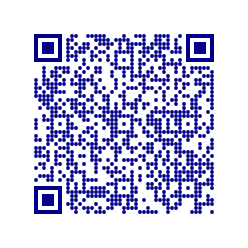
var circles = new QRCodeImageBuilder("https://example.com")
    .WithModuleShape(CircleModuleShape.Default, sizePercent: 0.95f)
    .WithCodeColor(SKColors.DarkBlue)
    .ToByteArray();

var roundedFinders = new QRCodeImageBuilder("https://example.com")
    .WithFinderPatternShape(RoundedRectangleFinderPatternShape.Default)
.ToByteArray();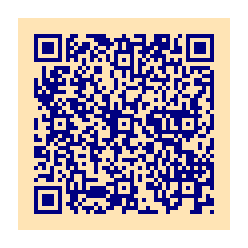 |
 |
 |
|---|
Use QREccLevel.H with an icon. Size the icon in modules so that it sits on the grid. This example uses version 5 to fit a 7-module icon with a 2-module border inside the default limit of 30% of the symbol width. For a short payload, WithVersion requests a larger version with more room for an icon.
var gradient = new QRCodeImageBuilder("https://example.com")
    .WithErrorCorrection(QREccLevel.H)
    .WithGradient(new GradientOptions([SKColors.Blue, SKColors.Purple, SKColors.Pink], GradientDirection.TopLeftToBottomRight, [0f, 0.5f, 1f]))
    .WithModuleShape(RoundedRectangleModuleShape.Default, sizePercent: 0.9f)
    .ToByteArray();

using var logo = SKBitmap.Decode(File.ReadAllBytes("logo.png"));
var withLogo = new QRCodeImageBuilder("https://example.com")
    .WithVersion(5)
    .WithModulePixelSize(12)
    .WithErrorCorrection(QREccLevel.H)
    .WithColors(codeColor: SKColors.DarkGreen, backgroundColor: SKColors.LightYellow)
    .WithIcon(IconData.FromImageByModules(logo, iconSizeModules: 7, iconBorderModules: 2))
    .ToByteArray();

// Size the icon by percent and pixels instead
var byPercent = IconData.FromImage(logo, iconSizePercent: 15, iconBorderWidth: 10);

// Text below the icon
using var font = new SKFont { Size = 18, Typeface = SKTypeface.FromFamilyName("sans-serif", SKFontStyle.Bold) };
var withText = new IconData
{
    Icon = new ImageTextIconShape(logo, "FooBar", SKColors.Black, font, textPadding: 2),
    IconSizePercent = 13,
    IconBorderWidth = 18,
}; |
|
|---|
PNG is the default. WithFormat selects JPEG or WebP with a quality from 0 to 100. SVG output is vector, takes every styling option, and uses the size as its viewport. Square modules give compact SVGs. Custom shapes and gradients make them larger.
var jpeg = new QRCodeImageBuilder("https://example.com").WithFormat(SKEncodedImageFormat.Jpeg, quality: 90).ToByteArray();
var webp = QRCodeImageBuilder.GetImageBytes("https://example.com", SKEncodedImageFormat.Webp, QREccLevel.M, size: 512, quality: 80);
var svg = new QRCodeImageBuilder("https://example.com").WithCodeColor(SKColor.Parse("1B9CFC")).ToSvgString();SymbolRenderer draws QRCodeData, MicroQRCodeData, or RmQRCodeData on an existing SKCanvas, so you can place a symbol inside other SkiaSharp graphics. It centers the symbol in area with square modules and fills the rest of area with the background.
var qrData = QRCodeGenerator.Create("content", QREccLevel.M);
using var surface = SKSurface.Create(new SKImageInfo(400, 400));
SymbolRenderer.Render(surface.Canvas, SKRect.Create(50, 50, 300, 300), qrData, SKColors.Black, SKColors.White);
Pattern 15 in samples/ConsoleApp uses it to draw a symbol in a card with text.
SymbolImageWriter.TryWritePixels writes the pixel layouts these libraries use, and LuminanceConverter turns their pixels into luminance for TryDecodeImage. Choose the PixelLayout by the byte order in memory. A format's name does not always show it.
| Library | Pixel format | PixelLayout |
|---|---|---|
| System.Drawing | Format32bppArgb |
Bgra8888 |
| System.Drawing | Format32bppPArgb |
Bgra8888, premultiplied |
| System.Drawing | Format32bppRgb |
Bgr888x |
| System.Drawing | Format24bppRgb |
Bgr24 |
| WPF | PixelFormats.Bgra32 |
Bgra8888 |
| WPF | PixelFormats.Pbgra32 |
Bgra8888, premultiplied |
| WPF | PixelFormats.Bgr32 |
Bgr888x |
| WPF | PixelFormats.Bgr24, PixelFormats.Rgb24 |
Bgr24, Rgb24 |
| ImageSharp | Rgba32, Bgra32 |
Rgba8888, Bgra8888 |
| ImageSharp | Rgb24, Bgr24 |
Rgb24, Bgr24 |
- For a premultiplied format, pass
premultipliedAlpha: trueto bothTryWritePixelsandLuminanceConverter.Convert. - A 24-bit row is often padded to a multiple of four bytes. Pass the row stride that the library reports, not width × 3.
- The fourth byte of
Format32bppRgbandBgr32is not alpha, and files from other tools may hold 0 there. Read asBgra8888, a 0 is a transparent pixel and the image turns white. UseBgr888x.
Each sample makes a symbol in the library's own image type and decodes it back: System.Drawing, WPF (with a window that reads QR codes from images), and ImageSharp. ImageSharp 3.2.0 and later need a Six Labors license key for Release builds.
The decoders read module matrices, screenshots, generated images, scans, and camera photos. They handle rotated, mirrored, and tilted symbols, gradual shading, and soft-edged shadows. Glare, damage, blur, curved surfaces, steep angles, and strong lens distortion make reads less reliable. Use the decoder for the symbol type you expect, or SymbolDecoder for all three.
// A generated symbol or a byte-per-module matrix
if (QRCodeDecoder.TryDecode(qrData, out var text))
    Console.WriteLine(text);

// An image file, with FeatherQR.SkiaSharp
using var bitmap = SKBitmap.Decode("qr.png");
if (QRCodeDecoder.TryDecode(bitmap, out text, out var info))
    Console.WriteLine($"{text} (version {info.Version}, ECC {info.EccLevel})");

// Pixels from any other source, here RGBA with rows of rowBytes bytes
var luminance = new byte[width * height];
LuminanceConverter.Convert(rgba, width, height, rowBytes, PixelLayout.Rgba8888, premultipliedAlpha: false, luminance);
if (QRCodeDecoder.TryDecodeImage(luminance, width, height, out text, out info))
    Console.WriteLine(text);
The core decodes luminance (grayscale) pixels. LuminanceConverter converts the layouts that TryWritePixels writes, with any row stride, and composites transparent pixels on white to match the quiet zone. A camera frame in NV12, NV21, or I420 has its luminance in the Y plane. Convert that plane as Gray8.
FeatherQR.SkiaSharp adds the SKBitmap overloads as C# 14 extension members. On C# 13 or earlier, call QRCodeDecoderExtensions, MicroQRCodeDecoderExtensions, RmQRCodeDecoderExtensions, or SymbolDecoderExtensions directly.
A failed decode reports a status that names the failed stage. A successful image decode also returns Corners: the corners of the module area without the quiet zone, in image pixel coordinates. TopLeft is the corner next to the symbol's top-left finder pattern, wherever that is in the image. So the outline follows rotation, mirroring, and perspective. Matrix decodes report Corners.IsEmpty. samples/Dotfiles/DecodeCorners.cs draws the outlines over sample images.
DecodeSymbols reads an SKBitmap or a stream with FeatherQR.SkiaSharp, and DecodeImageSymbols reads luminance data with the core. Each returns every decodable symbol once, with its corners, and skips symbols inside a decoded symbol. The span overload of DecodeImageSymbols stops when your buffer is full. SymbolDecoder decodes Standard QR first, and then reads the remaining finder patterns as Micro QR and rMQR. Each result has Symbology, Text, Corners, and the detailed result in its StandardQR, MicroQR, or RmQR property.
using var sheet = SKBitmap.Decode("sheet.jpg");
foreach (var result in QRCodeDecoder.DecodeSymbols(sheet))
    Console.WriteLine($"{result.Text} at ({result.Info.Corners.TopLeft.X}, {result.Info.Corners.TopLeft.Y})");

foreach (var symbol in SymbolDecoder.DecodeSymbols(sheet))
    Console.WriteLine($"{symbol.Symbology}: {symbol.Text}");
A search for every symbol takes longer than a decode of one, even with one symbol in the image. Images with many finder patterns of other codes can take several times longer. SymbolDecoder takes longer than one decoder, especially when it finds finder patterns but decodes nothing. Use a single-symbology decoder when you know the type.
Each builder method that writes an image to a Stream has an async version: SaveToAsync, SaveToSvgAsync, SavePngAsync, and SaveSvgAsync. With FeatherQR.SkiaSharp, the decoders read an encoded image from a stream with Decode or DecodeAsync for one symbol, and DecodeSymbols or DecodeSymbolsAsync for all. The core has no stream overloads, because it reads pixels, not image files. Methods that work in memory, such as ToByteArray, TryDecode(bitmap), and every SymbolImageWriter method, have no async version because they do no I/O.
- An async write renders the whole image first, so a rendering failure leaves the stream unchanged. It does not flush the stream.
- A stream read starts at the current position, reads to the end, and leaves the stream open. It does not apply EXIF orientation.
- A one-symbol read returns a result even when nothing decodes. Check
Success, and readInfo.Statusfor the reason. - Cancellation is checked before rendering and while writing, so a canceled write may leave partial output. A read checks it before decoding, during reads, and between symbol attempts.
- Argument errors throw at the call. Other errors come through the task.
- An async call captures its inputs, so you can change the builder or dispose the icon right after the call. Custom shape objects are not copied. Keep them usable until the task completes.
ASP.NET Core disables synchronous I/O on request and response bodies by default. Use the async methods, return the bytes, or write to the response's PipeWriter.
app.MapGet("/qr.png", async (string text, HttpResponse response, CancellationToken cancellationToken) =>
{
    response.ContentType = "image/png";
    await QRCodeImageBuilder.SavePngAsync(text, response.Body, cancellationToken: cancellationToken);
});

app.MapGet("/qr.svg", (string text) =>
    Results.Text(SymbolImageWriter.GetSvgString(QRCodeGenerator.Create(text, QREccLevel.M)), "image/svg+xml"));

// No copy. Cancellation applies only to the flush.
app.MapGet("/qr-pipe.png", async (string text, HttpResponse response, CancellationToken cancellationToken) =>
{
    response.ContentType = "image/png";
    SymbolImageWriter.WritePng(QRCodeGenerator.Create(text, QREccLevel.M), response.BodyWriter);
    await response.BodyWriter.FlushAsync(cancellationToken);
});

app.MapPost("/scan", async (HttpRequest request, CancellationToken cancellationToken) =>
{
    try
    {
        var result = await QRCodeDecoder.DecodeAsync(request.Body, cancellationToken);
        return result.Success
            ? Results.Text(result.Text)
            : Results.Text(result.Info.Status.ToString(), statusCode: StatusCodes.Status422UnprocessableEntity);
    }
    catch (InvalidDataException)
    {
        return Results.BadRequest(); // not an image, or over a limit
    }
});
In UI apps, the async methods render and decode on the thread pool, so the UI thread stays free. Without a synchronization context, as in ASP.NET Core, the work stays on the calling thread. SymbolImageWriter renders even a version 40 symbol in well under one frame at 8 pixels per module. A UI app can render on the UI thread and await only the file write.
A stream read rejects input over 64 MiB, or an image over 16,777,216 pixels (4,096 × 4,096), with InvalidDataException before it allocates pixels. The message names the limit. The defaults allow a 12-megapixel photo, but not a 24- or 48-megapixel photo from a recent phone. At these limits, an interlaced PNG with 16 bits per channel used 192 MiB to decode. For larger images, pass ImageStreamReadLimits.
// A 200-megapixel photo. The same kind of PNG used 3,078 MiB at 16,384 × 16,384.
var limits = new ImageStreamReadLimits { MaxPixels = 16_384L * 16_384, MaxBytes = 256 * 1024 * 1024 };
var large = await QRCodeDecoder.DecodeAsync(photo, limits, cancellationToken);
Micro QR and rMQR have their own generators, image builders, and decoders, with the same shape as the Standard QR ones. See Data Capacity for the versions and their limits.
Micro QR is a smaller square symbol for short data. The generator selects the smallest version from M1 to M4 that fits.
var pngBytes = MicroQRCodeImageBuilder.GetPngBytes("01234567", MicroQREccLevel.L, size: 256);

var styled = new MicroQRCodeImageBuilder("SKU-42")
    .WithModulePixelSize(14)
    .WithErrorCorrection(MicroQREccLevel.M)
    .WithColors(codeColor: SKColor.Parse("2D3436"), backgroundColor: SKColors.White)
    .WithModuleShape(RoundedRectangleModuleShape.Default, sizePercent: 0.92f)
    .WithGradient(new GradientOptions([SKColor.Parse("00B894"), SKColor.Parse("0984E3")], GradientDirection.TopLeftToBottomRight))
    .ToByteArray();

var micro = MicroQRCodeGenerator.Create("01234567", MicroQREccLevel.L);
if (MicroQRCodeDecoder.TryDecode(micro, out var text, out var info))
Console.WriteLine($"{text} ({info.Version}, ECC {info.EccLevel})"); // 01234567 (M2, ECC L) |
|
|---|
ConsoleApp patterns 24–26 have runnable examples.
rMQR is a rectangular symbol for space where a square does not fit well. By default, the generator selects the version with the smallest area. You can fix the height instead, or prefer the shortest height.
// size sets the width. The height follows the symbol's aspect ratio.
var pngBytes = RmQRCodeImageBuilder.GetPngBytes("https://example.com/r/12345", RmQREccLevel.M, size: 512);

// A fixed height. The generator selects the width.
var fixedHeight = new RmQRCodeImageBuilder("https://example.com/r/12345")
    .WithHeight(RmQRHeight.H9)
    .WithErrorCorrection(RmQREccLevel.H)
    .WithModulePixelSize(12)
    .WithColors(codeColor: SKColor.Parse("2D3436"), backgroundColor: SKColors.White)
    .WithModuleShape(RoundedRectangleModuleShape.Default, sizePercent: 0.9f)
    .ToByteArray();

// The shortest height
var flat = RmQRCodeGenerator.Create("012345678901", RmQREccLevel.M, new RmQRCodeGeneratorOptions { FitStrategy = RmQRFitStrategy.MinimizeHeight });
Console.WriteLine(flat.Version); // R7x43

var rmqr = RmQRCodeGenerator.Create("012345678901", RmQREccLevel.M);
if (RmQRCodeDecoder.TryDecode(rmqr, out var text, out var info))
    Console.WriteLine($"{text} ({info.Version}, ECC {info.EccLevel})"); // 012345678901 (R11x27, ECC M)
RmQRFitStrategy ranks versions by their modules without the quiet zone. With the quiet zone, a version with fewer modules can make a larger image. For example, 24 characters at ECC H go from R15x59 (63 × 19 with the quiet zone) under Single to R11x77 (81 × 15) under Optimal. Use Single if you depend on the exact bit stream or image size of releases before 2.0.0.
ConsoleApp patterns 27–29 have runnable examples.
To get the largest modules in a frame, find the narrowest version at each of the six heights, and then take the one with the largest modules. At a fixed height, a narrower symbol never has smaller modules, so these six calls find the best of all 32 versions. The version whose aspect ratio is closest to the frame's is often worse. For 9 characters in a 400 × 60 frame, that is R17x139 with 2-pixel modules, and the six calls choose R7x59 with 5-pixel modules.
const string text = "HELLO2026";
int frameWidth = 400, frameHeight = 60;
RmQRVersion? best = null;
var bestModule = 0;
foreach (var height in Enum.GetValues<RmQRHeight>())
{
    var fit = new RmQRCodeGeneratorOptions { Height = height, FitStrategy = RmQRFitStrategy.MinimizeWidth };
    if (!RmQRCodeGenerator.TryGetRequiredBufferSize(text, RmQREccLevel.M, out var size, fit))
        continue; // The text does not fit at this height.
    // size.Width and size.Height include the quiet zone, as the image does.
    // Whole pixels per module, as the image is written. With FillCanvas, divide as double.
    var module = Math.Min(frameWidth / size.Width, frameHeight / size.Height);
    if (module > bestModule)
        (best, bestModule) = (size.Version, module);
}
Console.WriteLine(best); // R7x59

var rmqr = RmQRCodeGenerator.Create(text, RmQREccLevel.M, new RmQRCodeGeneratorOptions { Version = best });
var png = SymbolImageWriter.GetPngBytes(rmqr, new SymbolImageOptions { Width = frameWidth, Height = frameHeight });SkiaSharp brings its native assets for Windows, macOS, iOS, and Android by itself. Add a native asset package in these cases:
- Linux: add one of the two Linux packages below.
- NativeAOT: add the package for each runtime you publish, as tests/FeatherQR.AotAnalysis does.
- WebAssembly: add
SkiaSharp.NativeAssets.WebAssembly, as the Playground does.
<PackageReference Include="FeatherQR.SkiaSharp" Version="2.0.0-preview.9" />

<!-- Linux with font support. Needs libfontconfig1. -->
<PackageReference Include="SkiaSharp.NativeAssets.Linux" Version="4.148.0" />
<!-- Linux without font dependencies -->
<PackageReference Include="SkiaSharp.NativeAssets.Linux.NoDependencies" Version="4.148.0" />
<!-- NativeAOT on Windows or macOS -->
<PackageReference Include="SkiaSharp.NativeAssets.Win32" Version="4.148.0" />
<PackageReference Include="SkiaSharp.NativeAssets.macOS" Version="4.148.0" />
sudo apt update && sudo apt install -y libfontconfig1NoDependencies can still draw text, but it cannot use system fonts or find fonts by character. See SkiaSharp issue #964.
The library sets IsAotCompatible. CI publishes tests/FeatherQR.AotAnalysis, which includes the whole library, and treats trimming and AOT warnings as errors. With PublishTrimmed, check that your own content and rendering code does not depend on reflection or dynamic code.
<PropertyGroup>
  <PublishAot>true</PublishAot>
  <PublishTrimmed>true</PublishTrimmed>
  <InvariantGlobalization>true</InvariantGlobalization>
</PropertyGroup>
On x64, a default NativeAOT build targets the minimum instruction set of the OS, without AVX. .NET then reports AVX2, BMI2, and 256-bit vectors as unavailable on any CPU, so FeatherQR uses its 128-bit SIMD paths. It takes 1.0–2.0 times as long as with the JIT: about 2 times for Standard QR encoding and 1.3–1.5 times for image decoding.
If every target machine supports x86-64-v3 (Intel Core since Haswell, AMD since Excavator), enable it. FeatherQR then runs 10% slower than with the JIT at the median. On a CPU without AVX2, such as some Pentium, Celeron, and Atom models, the app exits at startup. It reports "The required instruction sets are not supported by the current CPU." ARM64 needs no setting.
<PropertyGroup>
  <IlcInstructionSet>x86-64-v3</IlcInstructionSet>
</PropertyGroup>FeatherQR runs in Blazor WebAssembly and standalone WebAssembly. See samples/BlazorWasm for Blazor, and the Playground source for standalone WebAssembly.
Call Dump() to show a QR code in the Results pane. This example uses System.Drawing on Windows only to display the image. FeatherQR does not use it.
Bitmap.FromStream(new MemoryStream(QRCodeImageBuilder.GetPngBytes("WIFI:T:WPA;S:mynetwork;P:mypass;;"))).Dump();The benchmarks run on .NET 10 with an AMD Ryzen 9 7950X3D CPU.
Each payload of the corpus:
 |
 |
|---|
Each symbology:
 |
 |
|---|
 |
 |
|---|
 |
 |
|---|
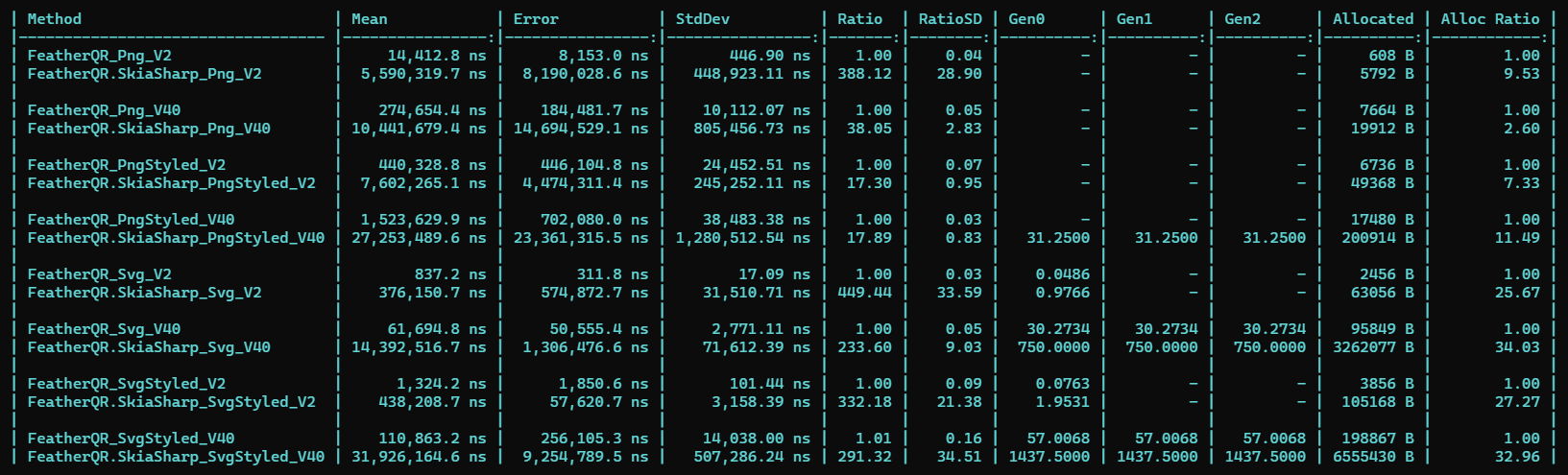
The same image from each package. The core SymbolImageWriter is faster and allocates less than FeatherQR.SkiaSharp.
MIT
FeatherQR.Gs1 includes THIRD-PARTY-NOTICES.md. Its AI table is generated from the Apache-2.0-licensed GS1 Barcode Syntax Dictionary.
To release a version:
From the repository root, update the versions in .props and .md files. The four packages (FeatherQR, FeatherQR.SkiaSharp, FeatherQR.Gs1, SkiaSharp.QrCode) share a version. The release workflow packs and publishes them together.
dotnet ./tools/bump_version.cs patch   # e.g. 0.1.0 → 0.1.1
dotnet ./tools/bump_version.cs minor   # e.g. 0.1.0 → 0.2.0
dotnet ./tools/bump_version.cs major   # e.g. 0.1.0 → 1.0.0